Top Solutions to Fix XAPK Installation Errors in 2026
For many gamers in Malaysia, encountering an XAPK installation error can be frustrating, especially when you're eager to play the latest titles. These errors often arise during the installation of games, leaving players puzzled and unable to enjoy their gaming experience. This comprehensive guide will explore common XAPK errors, provide solutions to fix these issues, and walk you through the manual installation process. Whether you’re a seasoned gamer or a newcomer, this article will help you troubleshoot and get back to gaming in no time.
Common XAPK Errors
Before we dive into solutions, it's essential to identify the common errors you might face while installing XAPK files. Here are a few frequently encountered installation issues:
- Error Code: 404 - This error typically indicates that the XAPK file is not found or has been deleted from the server. It's common when the game has been updated or removed from the source.
- Parsing Error - A parsing error often occurs when the XAPK file is corrupted or not compatible with your device. This error can prevent the installation process from proceeding.
- No Install Option - Sometimes, when you attempt to install an XAPK file, you may not see the installation option. This usually happens due to incorrect permissions or compatibility issues.
- Insufficient Storage - If your device lacks enough storage space, the installation will fail. Always ensure you have adequate space for new games.
- Version Compatibility - Many XAPK files are designed for specific Android versions. If your device is running an outdated version of Android, compatibility issues may arise.
These errors are common, especially among Malaysian gamers who frequently download games from platforms like APKPure. Understanding these issues is the first step towards finding a resolution.
Solutions to Fix Installation Issues
When faced with XAPK installation errors, there are several troubleshooting methods you can employ to resolve the issues. Here are some effective solutions:
- Check Device Compatibility - Always verify that your device's Android version is compatible with the XAPK file. You can usually find this information on the game's download page.
- Free Up Storage Space - Ensure that your device has sufficient storage. Consider deleting unnecessary apps or files to create space for the new game.
- Download a Reliable XAPK Installer - Using a dedicated XAPK installer, such as the XAPK Installer app from APKPure, can help manage and install XAPK files seamlessly.
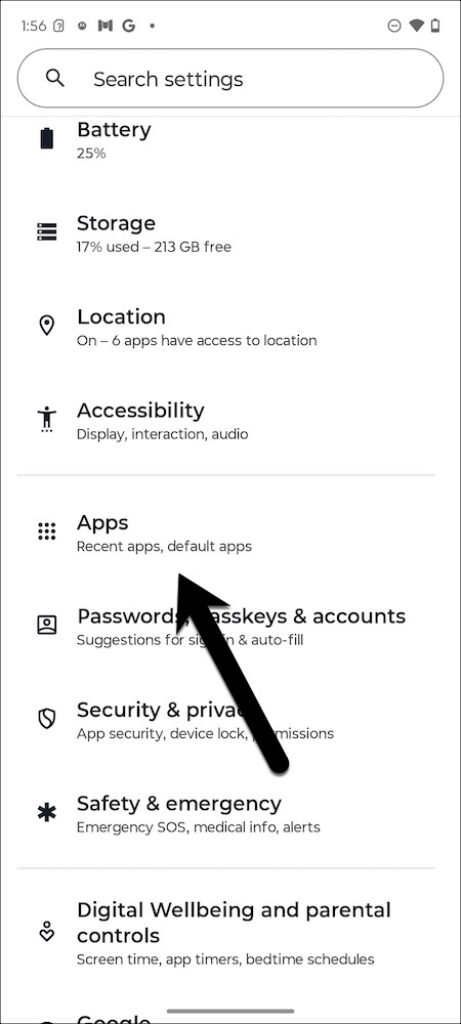
- Clear Cache and Data - Sometimes, clearing the cache and data for the installer app can resolve installation errors. Go to Settings > Apps > [Your Installer App] > Storage > Clear Cache and Clear Data.
- Re-download the XAPK File - If you suspect the file might be corrupted, delete it and try downloading it again from a reliable source.
These troubleshooting methods can help you resolve many common installation issues, allowing you to enjoy your gaming experience without interruptions.
Step-by-Step Guide to Manual XAPK Installation
If you're still encountering issues, manually installing XAPK files can often bypass common installation errors. Follow these steps for a successful manual installation:
- Download Required Files - First, download both the XAPK file and the corresponding APK file for the app you want to install.
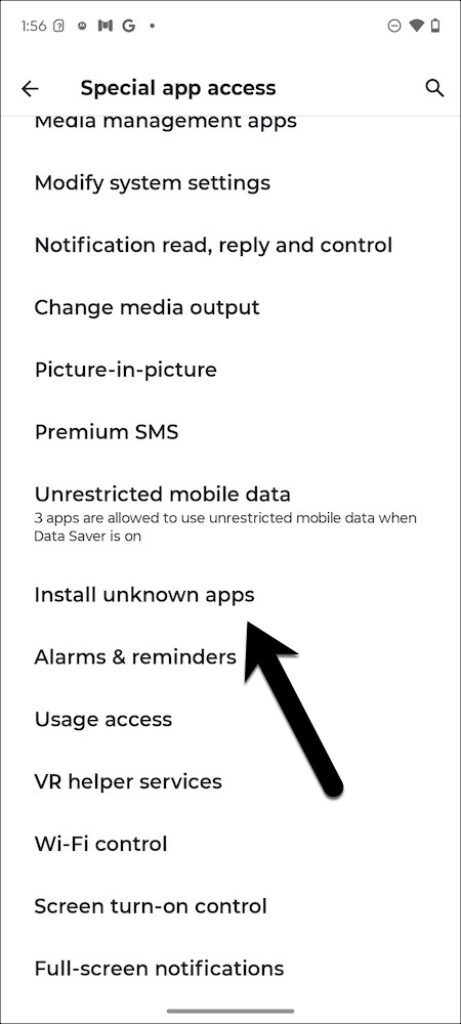
- Enable Unknown Sources - Go to your device's Settings > Security > Unknown Sources and enable it. This allows the installation of apps from sources other than the Google Play Store.
- Install the APK File - Locate the APK file you downloaded and tap on it to begin installation. Follow the prompts to complete the installation.
- Extract XAPK File - Use a file manager app to locate the XAPK file. Extract the contents of the XAPK file, which typically includes the APK and OBB folder.
- Copy OBB Folder - Move the extracted OBB folder to the appropriate directory: Android > OBB > [Package Name of the App].
- Launch the Game - Once everything is in place, launch the game from your app drawer. If all goes well, it should start without any installation errors.
By following these steps, you can manually install XAPK files and avoid the common pitfalls that lead to installation errors.
Frequently Asked Questions (FAQ)
What is an XAPK file?
An XAPK file is a package that contains an APK file along with its data files, typically used for Android games. Unlike APK files, XAPK files are designed to streamline the installation process by including necessary data files (like OBB files) within one package. This is especially useful for larger games that require additional resources to function correctly.
Why is my XAPK not installing?
There are several reasons why your XAPK might not be installing. Common causes include compatibility issues with your device, insufficient storage space, or a corrupted XAPK file. Ensuring that your Android version is compatible and having enough storage can often resolve these issues. Following the troubleshooting methods outlined in this guide can also help you get past installation roadblocks.
Conclusion
Installation errors can be a significant hurdle for gamers looking to enjoy their favorite titles. However, understanding the common issues and employing the right troubleshooting methods can make a world of difference. Whether you opt for a dedicated XAPK installer or choose to go the manual installation route, this guide has equipped you with the knowledge to tackle XAPK installation errors in 2026 effectively.

Now that you're armed with the tools and knowledge needed to fix XAPK installation errors, dive back into your gaming adventures. Happy gaming!