Understanding Ping
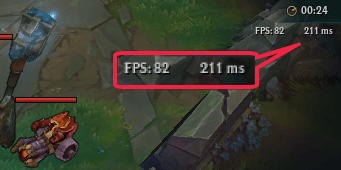
In the world of online gaming, especially in competitive titles like League of Legends, ping is a crucial factor that can determine your success or failure in a match. So, what exactly is ping? In simple terms, ping measures the latency or the time it takes for your computer to send a request to a game server and receive a response back. This measurement is typically expressed in milliseconds (ms). Lower ping times are essential for a smooth gaming experience, as high ping can lead to lag, delays in gameplay, and can even affect your reaction times during intense moments.
For gamers in Malaysia, ping can often fluctuate due to various factors such as distance from servers, internet service provider (ISP) performance, and network congestion. Understanding how to manage and reduce ping is vital for gamers who want to excel in League of Legends.

Best VPNs for Gaming in Malaysia
One effective method to reduce League of Legends ping in Malaysia is by using a Virtual Private Network (VPN). VPNs can reroute your internet traffic, potentially connecting you to a server that offers better latency for online gaming. Here are some of the top VPNs that Malaysian gamers can consider:
- ExpressVPN
- Pros: Fast speeds, user-friendly interface, strong encryption.
- Cons: Higher price point compared to competitors.
- NordVPN
- Pros: Large server network, excellent security features, affordable.
- Cons: The app can be slightly slower to connect.
- Surfshark
- Pros: Unlimited device connections, budget-friendly, decent speed.
- Cons: Fewer servers than some competitors.
Using a VPN can significantly lower your ping by finding a more direct route to the game server. However, it’s essential to choose a VPN that has servers located close to your gaming server for the best results. Notice how the right VPN can transform your gaming experience, making it less frustrating and more enjoyable.

Optimizing Your Internet Connection
Aside from using a VPN, optimizing your home internet connection can further help in reducing ping. Here are some effective strategies:
- Use a Wired Connection: Connecting your gaming device directly to the router via an Ethernet cable can lower latency compared to Wi-Fi. Wireless connections often suffer from interference and signal loss.
- Upgrade Your Internet Plan: Check with your ISP to see if there are faster plans available. Higher bandwidth can lead to reduced ping and a smoother gaming experience.
- Router Settings: Access your router’s settings and ensure you’re using the optimal configuration. This includes enabling Quality of Service (QoS) settings that prioritize gaming traffic over other types of internet usage.
- Change DNS Settings: Switching to a faster DNS server, such as Google DNS or Cloudflare DNS, can help speed up connection times.
Moreover, ensure that your router firmware is up to date, as manufacturers often release updates that can improve performance and security. By implementing these optimizations, you can enhance your internet speed and reduce ping significantly.
Troubleshooting Ping Issues
Even after optimizing your connection and using a VPN, you may still experience high ping. Here’s a checklist to help diagnose and fix common issues:
- Check for Background Applications: Ensure no other applications are using bandwidth while you’re gaming. Close any unnecessary programs, especially those that stream videos or download files.
- Test Your Internet Speed: Use online speed tests to check your current internet speed. If you notice significant discrepancies with what you’re paying for, contact your ISP.
- Use Ping Test Tools: Tools like PingPlotter can help you identify where the high latency is occurring, whether it’s on your end or with the game server.
- Restart Your Router: Sometimes, simply rebooting your router can resolve temporary connectivity issues.
By systematically going through this checklist, you can identify potential issues that may be contributing to high ping and take corrective actions.

FAQs
What causes high ping in League of Legends?
High ping in League of Legends can stem from various factors, including your distance from the game server, network congestion, ISP limitations, and even the type of connection you’re using (wired vs. wireless). Any of these elements can contribute to delays, making it essential to diagnose and address them effectively.
Can a VPN help reduce ping?
Yes, using a VPN can help reduce ping in some cases by providing a more direct connection to the game server. This can be particularly beneficial if your ISP routes data inefficiently. However, it’s crucial to choose a fast and reliable VPN service to see meaningful improvements.
By following the tips outlined in this article, Malaysian gamers can significantly reduce their League of Legends ping and enjoy a smoother gaming experience. Whether through VPNs, optimizing your connection, or troubleshooting issues, taking proactive steps can make all the difference in your gameplay.