Understanding Lag
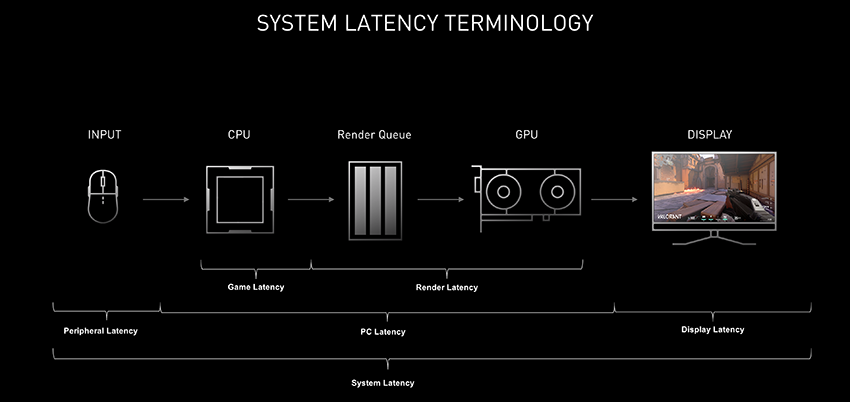
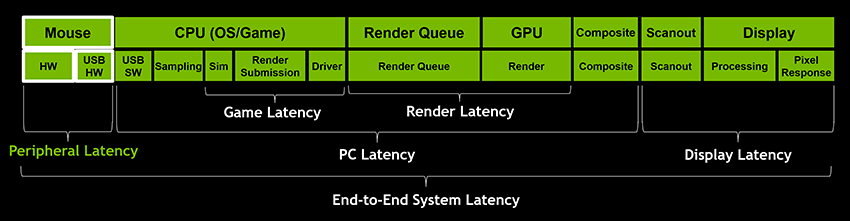
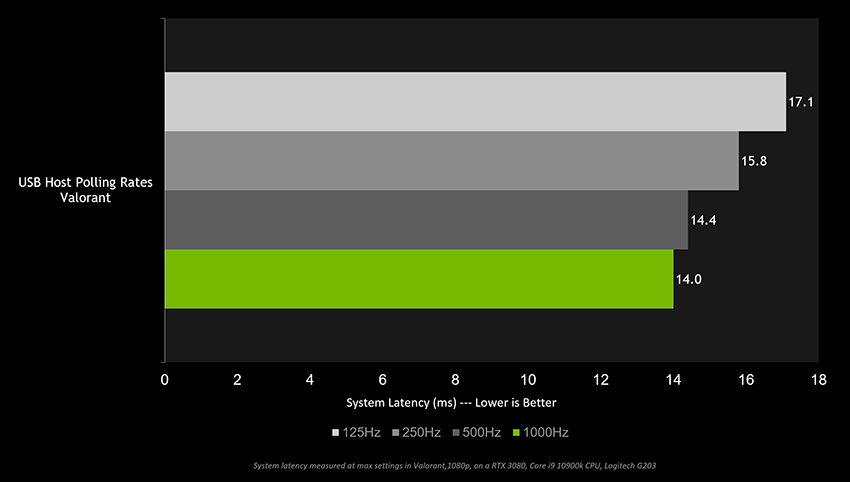
Lag is a common issue that plagues gamers, especially those using low-end PCs. It refers to the delay between a player's input and the game's response, often measured in milliseconds. This lag can be frustrating, leading to missed shots in competitive games or an overall unsatisfactory gaming experience. Several factors contribute to lag, including slow hardware, poor internet connectivity, and unoptimized settings.
When it comes to gaming on a low-end PC, lag can severely affect performance, leading to lower frames per second (FPS) and stuttering gameplay. It's essential to identify the causes of lag to effectively tackle the problem and enhance your gaming experience.
Optimizing PC Settings
One of the simplest ways to minimize lag on a low-end PC is to optimize your settings. Here are some key adjustments you can make:
- Graphics Settings: Lowering the graphics settings in your game can significantly improve performance. Start by reducing the resolution and turning off or lowering features like shadows, textures, and anti-aliasing.
- Power Settings: Ensure your PC is set to 'High Performance' mode in the power settings. This option maximizes your PC's resources and reduces lag during intensive gaming sessions.
- Background Applications: Close unnecessary applications running in the background that consume CPU and RAM. This frees up resources for your game, leading to a smoother experience.
By adjusting these settings, you can enhance your gaming experience significantly, even on a low-end PC. Remember, the goal is to find a balance between visual quality and performance.
Hardware Upgrades
If you're still experiencing lag after optimizing your settings, it might be time to consider hardware upgrades. Fortunately, there are affordable options that can lead to significant improvements:
- RAM Upgrade: Upgrading your RAM can significantly improve gaming performance, especially if you're currently running on 4GB or less. Increasing your RAM to 8GB or more can help your games run more smoothly and reduce lag.
- Solid State Drive (SSD): Swapping out your traditional hard drive for an SSD can dramatically improve load times and overall performance. Games will load faster, and your system will respond more quickly to commands.
- Graphics Card: If your budget allows, upgrading your graphics card can provide a substantial boost to gaming performance. Look for budget-friendly options that fit your low-end PC.
These upgrades can not only reduce lag but also extend the life of your low-end PC, making it capable of handling more demanding games.
Software Solutions
In addition to optimizing settings and upgrading hardware, several software solutions can help you tackle lag:
- Driver Updates: Regularly updating your graphics and system drivers can enhance overall performance. Most manufacturers provide updates frequently, so make it a habit to check for updates regularly.
- Game Mode: Windows 10 and later versions come with a 'Game Mode' that optimizes your PC for gaming. Enable it to prioritize resources for your game, reducing lag and improving FPS.
- Performance Monitoring Tools: Use tools like MSI Afterburner or Razer Cortex to monitor performance and make real-time adjustments to settings based on your gaming needs.
These software tools can provide quick fixes and ongoing improvements to your gaming experience, making them worth considering.
Game-Specific Tips
Lastly, each game may have specific settings that can help low-end PC users reduce lag. Here are some recommendations for popular games:
- League of Legends: Set the graphics to 'Low', disable shadows, and reduce the resolution to improve FPS.
- Counter-Strike: Global Offensive: Use the 'Low' settings for textures and disable vertical sync (V-Sync) to minimize input lag.
- Fortnite: Enable performance mode and lower the resolution to increase FPS significantly.
These adjustments can help you enjoy a smoother experience tailored to the specific demands of each game.
FAQ
What causes lag on a low-end PC?
Lag on a low-end PC can be caused by inadequate hardware specifications, such as insufficient RAM, slow processors, or outdated graphics cards. Additionally, poor internet connectivity, running too many background applications, and unoptimized game settings can exacerbate lag issues.
Can upgrading RAM help reduce lag?
Yes, upgrading RAM can significantly reduce lag, especially if your current setup has 4GB or less. More RAM allows your PC to handle more tasks simultaneously, improving performance in games and applications.
In the vibrant Malaysian gaming community, understanding how to fix lag on low-end PCs empowers gamers to make the most of their systems. By implementing these strategies, you can experience an enhanced gaming performance that minimizes frustration and maximizes enjoyment.