Introduction
In the dynamic world of mobile gaming, achieving high frames per second (FPS) is crucial for an immersive experience. For Malaysian gamers, where competition is fierce and gaming is often a communal activity, optimizing your Android game settings can significantly enhance your gameplay. This article will explore various settings and practical tips that can help you boost FPS in Android games throughout 2026.
Graphics Settings
One of the most effective ways to improve FPS in Android games is by adjusting the graphics settings. High-quality visuals can be stunning, but they often come at the cost of performance. Here's how you can tailor these settings for optimal performance:
- Resolution: Lowering the resolution can lead to a significant increase in FPS. For instance, switching from 1080p to 720p can boost FPS by up to 50%, making your gameplay smoother. This is particularly beneficial in action-packed games where every frame matters.
- Texture Quality: Reducing texture quality can also help. While high textures can make a game look incredible, they consume more memory. Opt for medium or low texture settings to find a balance between visuals and performance.
- Frame Rate Cap: Many games allow you to set a frame rate cap. Setting this cap appropriately can prevent your device from working harder than necessary, which can help maintain consistent FPS. For most games, a cap of 30 or 60 FPS is sufficient.
By carefully tweaking these graphics settings, you can significantly enhance your gaming experience, achieving higher FPS without sacrificing too much visual quality. This is especially useful in competitive gaming scenarios where every frame counts.
Performance Settings
Beyond graphics adjustments, there are several performance settings on your Android device that can be fine-tuned to maximize your gaming performance:
- Battery Saver Mode: While this feature is designed to extend battery life, it can restrict CPU performance, leading to lower FPS. Ensure that your device is in performance mode when gaming for the best results.
- Developer Options: Enabling Developer Options on your Android device allows you to modify animations and background process limits. Reducing or turning off animations can lead to smoother transitions and improved responsiveness.
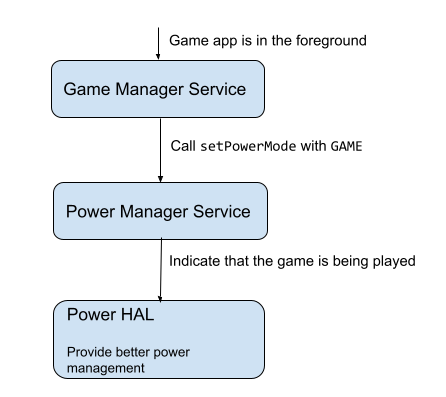
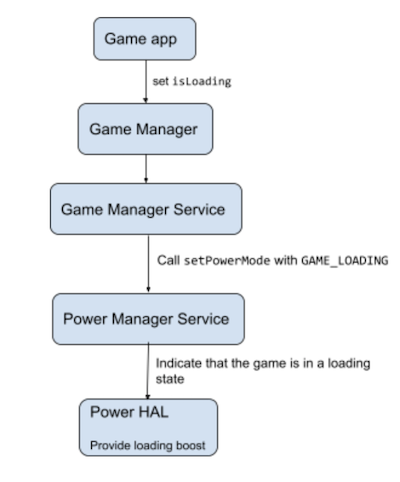
- Game Mode: Many modern Android devices come with a dedicated game mode that optimizes system resources for gaming. Enabling this mode can prioritize CPU and GPU performance, ensuring that your games run smoothly.
Implementing these performance settings can lead to a noticeable improvement in FPS and overall gaming performance, allowing you to enjoy your favorite titles without lag or stuttering.
Tips for Optimization
In addition to adjusting graphics and performance settings, here are some practical tips that can further optimize your device’s performance for gaming:
- Background App Management: Close unnecessary apps running in the background. Each app consumes CPU and memory resources, which can detract from your gaming performance. Consider using a task manager to monitor and close unused applications.
- Regular System Updates: Keeping your Android operating system and apps updated can improve performance and compatibility with the latest games. Updates often include performance enhancements and bug fixes that can contribute to smoother gameplay.
- Storage Management: Ensure you have enough free storage on your device. Low storage can slow down performance. Regularly delete unused apps, files, and cache to free up space.

These optimization tips can make a substantial difference in your gaming experience, ensuring that your Android device is running at its best when you need it most.
Recommended Apps
To further enhance your gaming performance, using specialized applications can be highly beneficial. Here are some recommended game booster apps and performance monitoring tools that can help improve FPS:
- Game Booster: This app optimizes your device's resources by shutting down background processes and freeing up RAM, resulting in improved FPS in games.
- GFX Tool: A widely used app among gamers, GFX Tool allows you to customize graphics settings for various games, enhancing FPS and visual quality.
- CCleaner: While not a game booster per se, CCleaner helps in optimizing your device by cleaning up storage space and managing apps, thereby indirectly boosting gaming performance.
Using these apps can provide additional layers of optimization, ensuring that your gaming sessions are as smooth and enjoyable as possible. Many Malaysian gamers have reported significant improvements in FPS after utilizing these tools.
FAQ
What settings can I change to improve FPS?
To improve FPS, consider lowering the resolution, reducing texture quality, and setting an appropriate frame rate cap. Additionally, adjust performance settings like enabling game mode and managing background apps.
Do game booster apps really work?
Yes, game booster apps can effectively enhance performance by optimizing system resources, closing background applications, and managing memory. Many users have experienced improved FPS and smoother gameplay after using these applications.
In conclusion, optimizing your Android game settings is essential for maximizing FPS and enhancing your overall gaming experience. With the right adjustments and tools, you can enjoy a smoother, more responsive gaming environment that keeps you competitive in 2026.