Unlocking Gaming Performance: 5 Essential Tips for Android in 2026
The gaming landscape in Malaysia has evolved tremendously in recent years. With mobile gaming on the rise, many gamers are looking for ways to enhance their gaming performance, especially on Android devices. Whether you're battling it out in a multiplayer arena or exploring vast open worlds, optimizing your Android device can make a significant difference. In this article, we’ll explore essential tips to help you unlock the full potential of your gaming experience in 2026.
What Factors Affect Gaming Performance?
Gaming performance on Android devices can vary significantly based on several factors. Understanding these elements can help you tailor your device for optimal performance.
- Hardware Specifications: The CPU, GPU, RAM, and storage capacity of your device play a crucial role in determining gaming performance. Newer models typically offer better specifications, allowing for smoother gameplay, higher frame rates, and improved graphics.
- Software Optimizations: The Android operating system and the specific game you are playing can also impact performance. Regular updates from both Google and game developers often include performance enhancements and bug fixes.
- Environmental Factors: External factors like temperature can affect device performance. Overheating can lead your device to throttle performance to prevent damage, which is something to keep in mind during long gaming sessions.
Tips for Improving Game Speed
Now that you know what affects gaming performance, let’s look at some actionable tips to improve speed and efficiency on your Android device.
- Clear Background Processes: Ensure that unnecessary apps are closed before launching your game. Background processes can consume system resources, leading to lag. Use the built-in task manager to clear these processes.
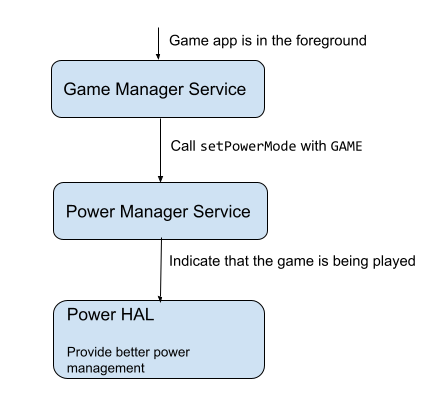
- Enable 'Game Mode': Many Android devices come with a 'Game Mode' feature that optimizes performance by restricting notifications and background tasks. Enabling this can significantly enhance your gaming experience.
- Adjust Graphics Settings: Lowering the graphics settings in your game can lead to smoother gameplay, especially on older devices. Experiment with the settings until you find the perfect balance between visuals and performance.
- Regularly Update Your Apps: Keeping your games and apps up to date ensures you benefit from the latest performance enhancements and bug fixes.
- Consider Overclocking: If you're tech-savvy, overclocking your device can lead to better gaming performance. However, it comes with risks, such as overheating and voiding warranties, so proceed with caution.
Best Apps for Optimizing Performance
To maximize your gaming performance, consider using performance-enhancing apps. Here are some of the best options available for Android users:

- Game Booster: This app optimizes your device by freeing up RAM and clearing background processes. It can significantly enhance your gaming speed, especially for resource-intensive games.
- CCleaner: While primarily known for cleaning junk files, CCleaner also helps to manage background processes and improve overall device performance, making it a useful tool for gamers.
- GFX Tool: This app allows you to modify graphics settings for many popular games, enhancing visuals while maintaining performance. It’s particularly useful for PUBG Mobile players looking to tweak their settings.
- Overclocking Apps: Apps like Kernel Adiutor let you overclock your CPU for better performance. Again, always proceed with caution and do your research before diving into overclocking.
Settings to Enhance Gaming Experience
Adjusting specific settings on your Android device can also lead to a better gaming experience. Here are some key settings to consider:
- Battery Saver: Make sure to disable battery saver mode while gaming. This mode limits performance to save battery life, which can lead to lag during gameplay.
- Developer Options: Enable developer options on your Android by tapping the build number multiple times in the settings. In this menu, you can adjust various settings, such as background process limits and animations, for better performance.
- Wi-Fi Settings: For online gaming, ensure you’re connected to a stable Wi-Fi network. Consider switching to 5GHz if your router supports it, as it offers faster speeds and reduces latency.
User Experiences and Reviews
Real user experiences can provide valuable insights into the effectiveness of various optimization strategies. Here are some testimonials from gamers who have improved their Android gaming performance:
- Amy, a 22-year-old gamer: "I noticed a huge difference after clearing background apps before gaming. My FPS improved significantly, especially in intense matches!"
- Rahman, a competitive player: "Using GFX Tool allowed me to play PUBG Mobile at high settings without lag. It's a game-changer!"
- Farah, a casual gamer: "I always thought my phone was too slow for gaming until I discovered Game Booster. Now, I can enjoy my favorite games without issues."
FAQ
What are the best apps to boost gaming performance?
Some of the best apps include Game Booster, CCleaner, GFX Tool, and various overclocking apps. Each of these can help optimize your device for a better gaming experience.
How can I make my Android phone faster for gaming?
To make your Android phone faster for gaming, clear background processes, enable game mode, lower graphics settings, and consider using optimization apps. Regular updates to both the device and apps are also essential.
By following these tips, you can significantly enhance your gaming performance on Android devices in 2026. Happy gaming!