Understanding Ping
For Malaysian gamers, especially those diving into competitive titles like CSGO, understanding ping is crucial for an optimal gaming experience. But what exactly is ping? In simple terms, ping refers to the time it takes for data to travel from your computer to the game server and back again. This is measured in milliseconds (ms), and lower numbers are always better.
High ping can lead to frustrating gameplay, causing latency issues that may result in delayed actions or disconnections. For instance, when you're in a heated firefight in CSGO, a high ping could mean that your shots register late or that you experience rubber-banding, where your character jumps around the map unpredictably. This can significantly affect your performance and overall enjoyment of the game.
Solutions to Reduce Ping
Reducing ping is essential for improving your gaming performance. Here are several strategies tailored for Malaysian gamers to help you tackle high latency issues effectively:
- Use a Wired Connection: Switching from Wi-Fi to a wired Ethernet connection can drastically lower your ping. This is because wired connections are more stable and less susceptible to interference.
- Optimize Your Network Settings: Tweaking specific network settings can enhance your connection to game servers.
- Choose the Right VPN: While VPNs can sometimes add latency, they can also help by connecting you to a closer or less congested server.
- Adjust Game Settings: Certain in-game settings can reduce the load on your network and improve your ping.
Testing Your Ping
Before making changes to your setup, it's wise to test your current ping. This can help you understand your starting point and measure improvements after implementing changes. Here’s how you can effectively test your ping:
- Use Online Tools: Websites like PingTest allow you to check your ping to various servers, including game servers you might use for CSGO.
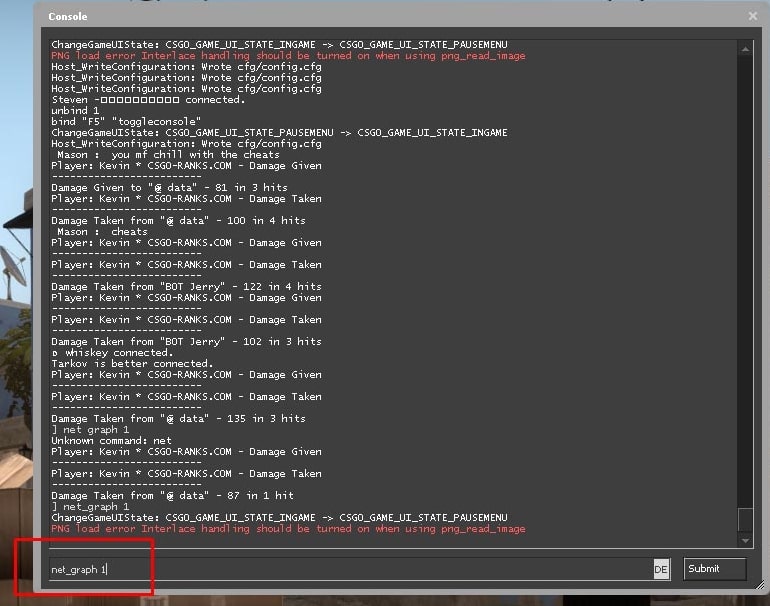
- In-Game Testing: You can also check your ping directly within CSGO. Simply join a game, and the ping will be displayed on the scoreboard.
Adjusting Network Settings
Here are specific network settings that can help decrease ping for Malaysian gamers:
- Router Settings: Access your router’s settings by typing its IP address into your web browser. Look for Quality of Service (QoS) settings, which can prioritize gaming traffic over other types of internet use.
- DNS Settings: Switching to a faster DNS can improve your connection speed. Consider using Google’s DNS (8.8.8.8 and 8.8.4.4) or Cloudflare’s DNS (1.1.1.1).
- Disable Background Applications: Ensure that other applications aren’t using your bandwidth while you’re gaming. Programs like streaming services or file downloads can significantly impact your ping.
Using a VPN for Improved Performance
Using a VPN can be a double-edged sword when it comes to gaming. On one hand, a VPN can help lower your ping by providing a more direct route to game servers, especially if you’re connecting to servers located in other countries. On the other hand, if the VPN server is far away or overloaded, it can increase your latency.
For Malaysian gamers, here are some pros and cons of using a VPN:
- Pros:
- Can reduce ping by connecting to closer servers.
- Helps avoid ISP throttling during peak hours.
- Cons:
- Can introduce additional latency if the VPN server is far away.
- Some VPNs might not support gaming traffic efficiently.
When choosing a VPN, look for one that has servers in Malaysia and offers low-latency connections. Test it out during gameplay to see if your ping improves.
Optimizing Game Settings
Finally, adjusting your game settings can also help reduce latency in CSGO:
- Lower Graphics Settings: Reducing the graphical fidelity can lessen the load on your system and network, which can indirectly help with ping.
- Enable Network Settings: In CSGO, enable “Network Settings” under the game options, where you can set your “Rate” and “Cl_cmdrate” settings to match your internet speed for optimal performance.
- Use the Right Server: Always connect to servers that are geographically closer to Malaysia for the best ping.
Frequently Asked Questions
What is ping in gaming?
As previously mentioned, ping is the time it takes for your device to send a request to a server and receive a response. In gaming, a lower ping translates to smoother gameplay, while a higher ping can lead to lag and connectivity issues.
How can I test my ping?
You can test your ping using online tools like PingTest or directly within CSGO. Simply join a game, and your ping will be displayed, allowing you to assess your connection quality.
Conclusion
By following these strategies, Malaysian gamers can effectively reduce their ping in CSGO, leading to a much more enjoyable gaming experience. Whether it’s optimizing your network settings, using a VPN wisely, or adjusting in-game settings, every little improvement can make a significant difference in your gameplay. Remember, the goal is to achieve the best connection possible so you can focus on what really matters—dominating the competition!